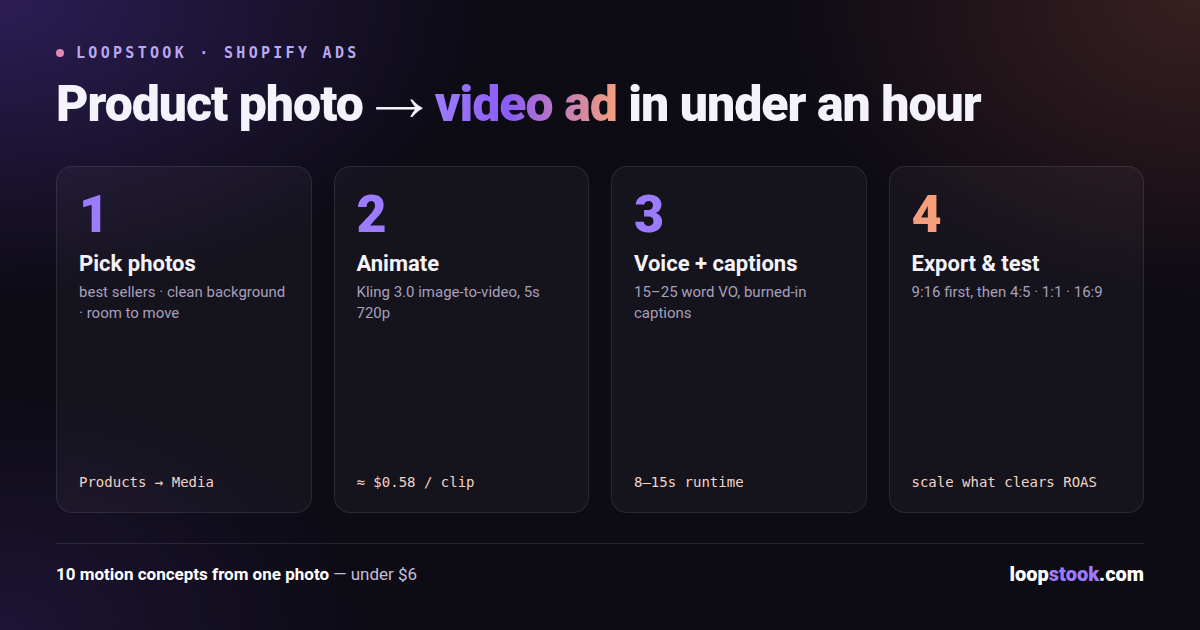
AI ads for Shopify work like this: take the product photos already sitting in your store, feed them to an image-to-video model like Kling 3.0 (about $0.58 per 5-second clip on LoopStook), add voice-over and captions, and export vertical variants for Reels, TikTok, and Shorts — no shoot, no editor, no agency.
The whole pipeline takes an afternoon the first time and under an hour once you've done it twice. Here's the exact workflow, including three copy-paste prompts for common Shopify product types.
Why Turn Product Photos into Video Ads?
Because your photos already carry the hard part — accurate product representation — and video is what paid social feeds reward. Meta and TikTok placements are built around motion; a static packshot competes for attention against full-motion content and usually loses. Image-to-video lets you keep your real product pixel-accurate while adding the movement the algorithm and the viewer both want.
The traditional alternative is a product video shoot: studio time, a videographer, weeks of turnaround, and one deliverable you're afraid to test against anything because it cost so much. AI flips that. At roughly $0.58 per clip, generating ten different motion concepts from one photo costs less than $6, so testing becomes the default instead of a luxury. The full merchant playbook lives at AI ads for Shopify.
Step 1: Which Product Photos Should You Use?
Start with your three to five best sellers — products with proven demand convert ad spend far better than experiments. For each, pull the strongest images from your Shopify admin (Products → Media) or your original photography folder. You're looking for:
- High resolution. The model animates the pixels you give it; a soft source makes a soft video.
- Clean, simple backgrounds. One clear subject animates more predictably than a cluttered scene.
- The product at a flattering angle — three-quarter views usually animate better than dead-on flat shots.
- Room around the subject. Tight crops leave the model nothing to move; a little negative space allows camera drift, rotation, and parallax.
Quick cleanup pays off: straighten, brighten, and remove distracting elements before generating. Two minutes in an editor saves you re-rolling clips later.
Step 2: How Do You Turn a Photo into a Video with Kling 3.0?
Upload the photo to LoopStook, select Kling 3.0 — the model known for motion quality and cinematic image-to-video — and describe the motion you want. Keep the product static and realistic; move the camera and the environment around it. A 5-second 720p clip runs about $0.58 at launch pricing on the Pro plan.
Prompt structure that works: camera movement + subject behavior + environment/lighting + mood. Here are three ready-to-use prompts for typical Shopify products:
Scented candle:
Slow cinematic dolly-in toward the lit candle on a marble countertop, flame flickering gently, thin wisp of smoke curling upward, warm evening window light from the left, soft shadow movement, cozy premium spa atmosphere, shallow depth of field, photorealistic.
Phone case:
Smooth 180-degree orbit around the phone case standing upright on a matte studio pedestal, studio light sweeping across the textured surface to reveal the finish, subtle reflections shifting, clean charcoal background with a soft gradient, crisp product-commercial look.
Supplement bottle:
Camera slowly rises and tilts down toward the supplement bottle on a sunlit kitchen counter, fresh citrus and green leaves resting beside it, morning light rays moving softly through steam from a nearby glass, bright, energetic wellness-brand mood, label staying sharp and legible.
Generate two or three takes per prompt and keep the best. Re-roll anything where the label warps or the product morphs — with clips this cheap, discarding a bad take costs nothing. More product-specific technique is covered in the AI product video generator guide.
Step 3: How Do You Add Voice-Over and Captions?
Silent product motion is B-roll, not an ad. Two additions turn it into one:
- Voice-over. Write a 15–25 word script per clip — hook, benefit, call to action — and generate it with ElevenLabs v3 inside LoopStook. Match the voice to the brand: warm and unhurried for the candle, punchy for the phone case, upbeat for the supplement.
- Captions. A large share of feed viewing happens with sound off, so burned-in captions are non-negotiable. The free AI caption generator produces styled, timed captions you can drop straight onto the clip; keep them in the middle-lower third, clear of platform UI.
Assemble clip + voice-over + captions + a closing logo/offer card in LoopStook's timeline editor. Total runtime: 8–15 seconds is plenty.
Export once per placement rather than letting platforms auto-crop your framing:
| Ad format |
Dimensions |
Where it runs |
| Vertical 9:16 |
1080 × 1920 |
Instagram Reels, TikTok, YouTube Shorts, Facebook Stories |
| Portrait 4:5 |
1080 × 1350 |
Instagram and Facebook feed (maximum feed real estate) |
| Square 1:1 |
1080 × 1080 |
Facebook/Instagram feed fallback, some Messenger placements |
| Landscape 16:9 |
1920 × 1080 |
YouTube in-stream, your Shopify product page embed |
Vertical 9:16 is the priority — it covers the three placements where short product video performs hardest.
Step 5: How Do You Test Small and Scale Winners?
Launch several distinct concepts (different hooks, motions, opening lines) at a small daily budget each, run them long enough to gather real purchase data — not just clicks — then cut the losers and move budget to the top one or two. Repeat weekly: your winner becomes the control, and new AI variants challenge it.
Judge everything against your margin, not vanity metrics. Compute your break-even return with the free ROAS calculator before you scale anything; a clip with cheap clicks that doesn't clear break-even ROAS is still a loser. Because each new variant costs well under a dollar to produce, the testing loop that used to consume a quarter's creative budget now runs on pocket change — the discipline, not the budget, becomes the constraint. For a fast way to generate the opening lines, see our 50-hook testing playbook.
Turn Your Catalog into Ads This Week
Pick your best seller, grab its best photo, and run the workflow above — photo to finished vertical ad in under an hour. The step-by-step merchant playbook is at AI ads for Shopify. Start free at loopstook.com — trial credits included, no card required.