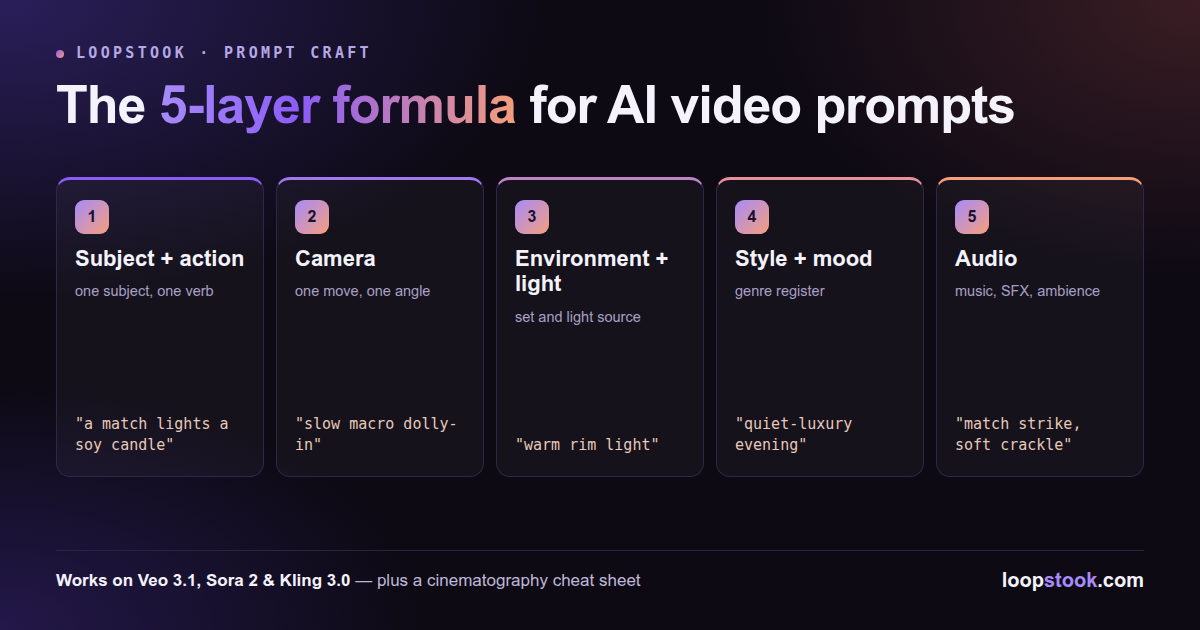
The most reliable AI video prompt structure is a five-layer formula, written in this order: (1) subject + action, (2) camera, (3) environment + lighting, (4) style + mood, (5) audio. It works on Veo 3.1, Sora 2, Kling 3.0, and every other current model because it mirrors how a director briefs a film crew.
Most bad AI video comes from bad prompts, not bad models. A pile of adjectives gives the model nothing to execute; five short layers give it a shot list. Learn the formula once and you can move between models without relearning anything.
The formula answers the five questions every shoot answers: what happens, how is it filmed, where and in what light, what does it feel like, and what does it sound like. Write one or two phrases per layer, always in the same order, and keep the whole prompt to 30–60 words.
- Subject + action — one subject, one concrete verb. "A barista pours steamed milk into espresso," not "a beautiful coffee scene."
- Camera — one move, one angle. "Slow overhead push-in." Two camera moves in one clip is how you get warped, drifting footage.
- Environment + lighting — the set and the light source. "Café counter, soft morning window light."
- Style + mood — the genre register. "Third-wave craft pride," "gritty documentary," "premium launch film."
- Audio — music, SFX, ambience. Essential on audio-native models like Veo 3.1; on silent models, this layer becomes your post-production note.
Order matters. Models weight early tokens heavily, so leading with subject + action ensures the thing you're selling is the thing the model prioritizes.
Which Cinematography Terms Should You Use in Prompts?
Use real film vocabulary — models are trained on footage labeled with it, so "dolly-in" outperforms "camera goes closer." This working vocabulary covers nearly every product and social clip you'll make.
| Term |
Layer |
What it does on screen |
| Dolly-in / dolly-out |
Camera |
Physically moves toward/away from subject; builds intensity or reveals context |
| Tracking shot |
Camera |
Follows a moving subject laterally; energy and momentum |
| Orbit / arc shot |
Camera |
Circles the subject; the classic 360° product hero move |
| Crane / tilt-up |
Camera |
Vertical rise or lift; scale and drama |
| Whip pan |
Camera |
Fast blur-pan between subjects; TikTok-style transitions |
| Handheld |
Camera |
Subtle shake; UGC authenticity, documentary feel |
| Low angle |
Camera |
Shoots up at the subject; power, monumentality |
| Rack focus |
Camera |
Shifts focus between planes; directs the eye mid-shot |
| Macro |
Camera |
Extreme close-up; texture, craftsmanship, ASMR detail |
| Shallow depth of field |
Camera |
Blurred background; isolates product, premium look |
| Golden hour |
Lighting |
Warm low sun; aspirational lifestyle glow |
| Blue hour |
Lighting |
Cool dusk tones; moody, cinematic calm |
| Rim light |
Lighting |
Bright edge outlining the subject; separation and polish |
| Softbox / diffused light |
Lighting |
Even, shadowless light; clean studio commerce look |
| Volumetric light |
Lighting |
Visible beams through haze; atmosphere and depth |
| Slow motion |
Style |
Stretched time; weight, luxury, physics showcase |
What Does a Weak Prompt vs. a Layered Rewrite Look Like?
The fastest way to internalize the structure is a before/after. Here's a typical first-attempt prompt:
Beautiful cinematic video of a luxury candle, high quality, 4K, amazing lighting, trending, hyperrealistic.
Every word is a quality plea; none is an instruction. There's no action, no camera, no light source, no sound. Now the same idea rewritten in five layers:
A match lights a soy candle, the flame catching and steadying. Slow macro dolly-in. Dark wooden shelf, single warm rim light, faint smoke drifting. Quiet-luxury evening mood. Audio: match strike, soft crackle, low ambient piano.
Same subject, same goal — but now the model has a physical event to simulate, one camera move to execute, a lighting plan, a tonal register, and a soundtrack. The weak version produces a generic rotating candle; the layered version produces a shot you'd storyboard.
The five layers stay fixed; the emphasis shifts. Each frontier model has a personality, and the formula lets you dial layers up or down to match it.
- Veo 3.1 — instruction follower with native audio. It executes precise directions and generates synchronized sound, so be literal in every layer and never skip layer 5. If you want a specific SFX or dialogue beat, write it out. Veo 3.1 rewards the most detailed prompts of the three — see 50 Veo 3.1 prompts for product ads.
- Sora 2 — physics realist. Its edge is material behavior: pours, splashes, fabric, steam, weight. Spend your word budget on layer 1 with physical verbs ("slumps," "billows," "settles") and Sora 2 will carry the realism — see 30 Sora 2 prompts for ecommerce.
- Kling 3.0 — motion and image-to-video specialist. Kling shines at camera movement and animating stills. Push layer 2 hardest — tracking shots, orbits, dramatic push-ins — and for image-to-video, describe only the motion since the still already defines layers 1, 3, and 4. Kling 3.0 is also cheap enough to be your drafting model.
A sane workflow: draft on Kling 3.0, re-render physics-heavy winners on Sora 2, and finish hero assets on Veo 3.1 when you need sound baked in.
What Are the Most Common Prompt Structure Mistakes?
Four failure modes account for most wasted generations. First, adjective stacking — "stunning, cinematic, 8K, masterpiece" adds nothing a layer wouldn't do better. Second, multiple camera moves in one clip; pick one and cut in the edit instead. Third, crowded subjects — two characters doing two things halves the coherence of both. Fourth, skipping audio on audio-native models, which outsources your sound design to chance.
When a generation fails, fix one layer at a time instead of rewriting the whole prompt — that's how you learn which layer the model ignored.
The fastest way to learn the five layers is to run the same prompt across models and compare — the LoopStook suite puts Veo 3.1, Sora 2, Kling 3.0, and ten more video models behind one subscription. Start free at loopstook.com with trial credits, no card required.